-
E-mail
kefu@dm89.cn
-
Phone
177-6801-1972
-
Address
Room 203, Building 1, Gusu Credit Industry Park, 338 Shizi Street, Suzhou City
Product Categories
- Traceability plan for production process
- Implementation Plan of MES in Copper Smelting Company
- Electronic barcode warehouse management solution
- Workshop Production Equipment Management Plan
- Working hour management system
- MES solution for the electronics industry
- Suzhou Machinery MES Integrated Application Solution
- Barcode Traceability System Solution
- Production safety inspection system
- Industry standard solution for temperature and humidity monitoring system
- Electronic Kanban Scheme for Production Safety Operation Violations
- Suzhou Dianmai Clothing Production Management Software Solution
- Automatic winding machine winding monitoring system
- Workshop electronic signage solution
- Production traceability management system
- Software solution for equipment maintenance work orders in the wire and cable industry
- Production time management system
- MES Data Collection Plan
- On site warehouse positioning management system
- Material Management System
Suzhou Dianmai Software System Co., Ltd
Automatic winding machine winding monitoring system
NegotiableUpdate on 10/01
- Model
- Nature of the Manufacturer
- Producers
- Product Category
- Place of Origin
Overview
In order to improve the production efficiency and management level of manufacturing enterprises, a system composed of current transformers, inertial measurement units (IMUs), and photoelectric counters is proposed to analyze and calculate the comprehensive equipment efficiency OEE, thereby monitoring the six major losses of mechanical equipment, which is of great practical significance
Product Details
In order to improve the production efficiency and management level of manufacturing enterprises, a system composed of current transformers, inertial measurement units (IMUs), and photoelectric counters is proposed to analyze and calculate the overall equipment efficiency OEE, and monitor the six major losses of mechanical equipment, which is of great practical significance. Compared with traditional methods in the past, it not only greatly improves the effectiveness of monitoring, but also has greater feasibility. The experimental results show that this system can effectively estimate the losses caused to mechanical equipment and has great market potential.
The winding monitoring system is designed for automatic winding machines, which includes real-time data monitoring of wire model width (Width) Xbar-R control chart and width online trend chart, and supports data display functions such as tables.Production workshop management monitoring system
1. Online SPC system login for package wrapping
The parallel wrapping SPC system can be accessed by opening the "Wrap Online SPC System" application in the SpcClient folder or by sending the "Wrap Online SPC System" application in the SpcClient folder to the desktop, and directly opening the user login window from the desktop.
Step 1: Double click to open the "Wrap Online SPC System", enter the enterprise administrator account or operator account and password, click the "Login" button in the user login window, and directly press the enter key to perform the "Login" operation.

Figure 1: Login Interface
Step 2: After successful login, jump to the main interface of the online SPC system for package wrapping.
2. Administrator main interface
After the administrator account successfully logs in to the online SPC system for package wrapping, it will be redirected to the main interface of the system.

Figure 2: Administrator main interface
3. Operator main interface
After successfully logging into the online SPC system for package wrapping, the operator account will be redirected to the main interface of the online SPC system for package wrapping. Case Study of Production Equipment Monitoring System in Electronic Production Industry

Figure 3: Operator Operation Interface
4. Production line specification parameter setting and data collection
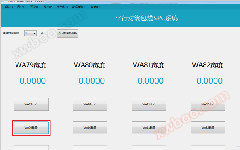
Step 1: Click on "WA79 Configuration" on the main interface to open the WA79 production line specification parameter setting interface. Without parameter settings, the [WA79] start operation cannot be performed.

Figure 4: Production line specification parameter settings and data collection
Step 2: After entering the parameter information, click the [Confirm] button to successfully configure the parameter information;

Figure 5: Rule parameter settings
Step 3: After successfully configuring the specification parameters, click the "WA79 Start" button on the main interface to pop up the online control chart interface for the wrapping width, and start data collection.

Figure 6:Online control chart interface for package width

Figure 7: Data Collection
Step four, click the corresponding 【 Print 】 button to print out the corresponding graphic. Click the corresponding 'Export' button to export to an Excel file.
Step 5: After completing the specification parameter collection, click the "WA79 Stop" button on the main interface to stop data collection and a warning window will pop up to close the prompt. Implementation Plan for SPC Management Software in Plastic Pipe Industry Monitoring

Figure 8: Stop data collection
Today, the editor will introduce so much to you. We will explain in detail the other menu bar functions and related operation processes of the winding monitoring management system in the encyclopedia! If you have any other questions, feel free to contact us at any time!
Similar Product Recommend