-
E-mail
2013990721@qq.com
-
Phone
15611259702
-
Address
No.7 Courtyard, West Jianguo, Xiaobao Roundabout, Songzhuang, Tongzhou District, Beijing
Product Categories
Beijing Kaixing Demao Instrument Equipment Co., Ltd

KDYL-01 unmanned rainfall environment monitoring station
NegotiableUpdate on 05/13
- Model
- Nature of the Manufacturer
- Producers
- Product Category
- Place of Origin
Overview
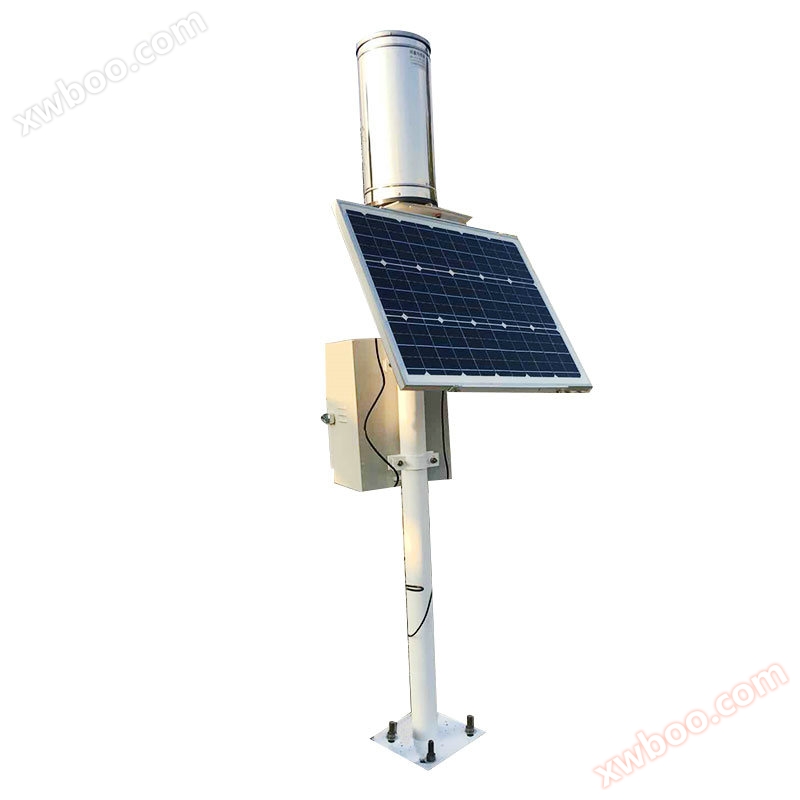
Basic information of KDYL-01 unmanned rainfall environment monitoring station: 1) Stainless steel bracket, height of 1.2 meters 2) Rainfall sensor 3) Solar power supply: solar panel, battery 4) Data acquisition transmitter Data transmission adopts GPRS and short message compatibility; Capable of sending data to three (or more) addresses; Equipped with watchdog function, it can automatically recover in case of malfunction; Capable of quantitatively sending alarm information based on rainfall data
Product Details
Basic information of KDYL-01 unmanned rainfall environment monitoring station:
1) Stainless steel bracket, with a height of 1.2 meters
2) Rainfall sensor
3) Solar power supply: solar panels, batteries
4) Data acquisition transmitter
The data transmission adopts GPRS and SMS compatible methods; Capable of sending data to three (or more) addresses; Equipped with watchdog function, it can automatically recover in case of malfunction; It has the function of quantitatively sending rainfall data and alarm information.
Data sampling frequency once per minute; The clock error of the collector shall not exceed 15S/month; Permanent data storage capacity not less than 32M; equipped with battery voltage detection function; Equipped with data call reply function; Equipped with remote parameter setting function.
Detailed introduction of rainfall sensor
Technical Specifications:
Measurement range: Rain intensity 0-4mm/min
Accuracy: 0.4mm ≤ 10mm ± 4%>10mm
◇ Resolution: 0.2mm
◇ Rain bearing diameter: 200mm
Weight: Approximately 3.5 kilograms
◇ Output signal: Single reed switch on/off, 5PULSE/MM (anti-interference resistor 100 ohms and capacitor 0.01 microfarads)
◇ Working environment temperature: -20~80 ℃
Function and Features:
◇ Small size, easy to install; High precision and good stability
Good linearity, long transmission distance, anti-interference ability
Design mesh holes at the funnel to prevent debris such as leaves from blocking the flow of rainfall
The support system of the tipping bucket component is well manufactured with low friction torque, making the tipping bucket component sensitive to flipping, stable in performance, and reliable in operation
The instrument casing is made of stainless steel, which does not rust and has excellent appearance quality
The rainwater receiving port is made of stainless steel sheet by integral punching and pulling, with high smoothness and small error caused by stagnant water
The chassis is equipped with a horizontal adjustment bubble inside, which can assist the bottom corner in adjusting the levelness of the equipment
Wireless automatic rainfall monitoring station data processing system
1. Summary
In order to facilitate customers to remotely query device monitoring data, our company has designed and developed the "Environmental Data Monitoring Center Management System", hereinafter referred to as the "Monitoring System". Customers can log in to the "Monitoring System" to query data. The login mode can select the mobile phone to log in and any computer with Internet environment to log in. Real time monitoring data can be queried when mobile phones are online, and real-time monitoring data and historical monitoring data can be queried when computers log on to the Internet.
2. Operation method
1) Account information
The login account and password will be uniformly set by our company and communicated to the user unit.
After the installation of the device, the customer will inform our company of the new SIM card number. Our company will establish a SIM card communication file for the customer, generate a login account for the customer, including basic information such as username, device ID, password, etc., and inform the customer that they can improve or change the basic information after logging in.
2) User login
The website of the Environmental Data Monitoring Center Management System is http://www.sj2000.org The customer logs in using the login account provided by our company
3) User Information List
After logging in, customers will enter the user information list page, where they can see the basic information of their weather station and make improvements. Click the "Edit" button in the "Edit" column to edit the information of this line, and then save to update it.
Click on 'Enter' to enter the main page for querying data.
4) Search the main page
In the user information list, select the corresponding row and double-click to enter the main page of your unit's detection data query.
(1) The upper part displays login information and the device ID of one's own unit.
(2) On the left is the function selection key. It is divided into functions such as "mobile version", "real-time data", "historical data", "historical curve", "return to list page", "user logout", etc.
Mobile version: A streamlined interface that customers see when logging into a website on their mobile phone for real-time data queries.
Real time data: The current monitoring data of the device and the statistical analysis results of the data during the time period (such as low value, high value, average value, etc.).
Historical data: Query monitoring data within a time period based on start and end times. And it can delete data and export data locally.
Historical curve: View the curve graphs of monitoring values for each channel to intuitively understand the trend of changes in monitoring values.
Return to the list page: Return to the customer list. (Customers can only see the basic information of their own meteorological station).
User logout: Click this button to return to the login interface.
Similar Product Recommend


