-
E-mail
sales@shmingzi.com
-
Phone
15358830119
-
Address
Building 1, 388 Dengyun Road, High tech Zone, Kunshan City, Jiangsu Province
Product Categories
Kartes Optical Instruments (Suzhou) Co., Ltd
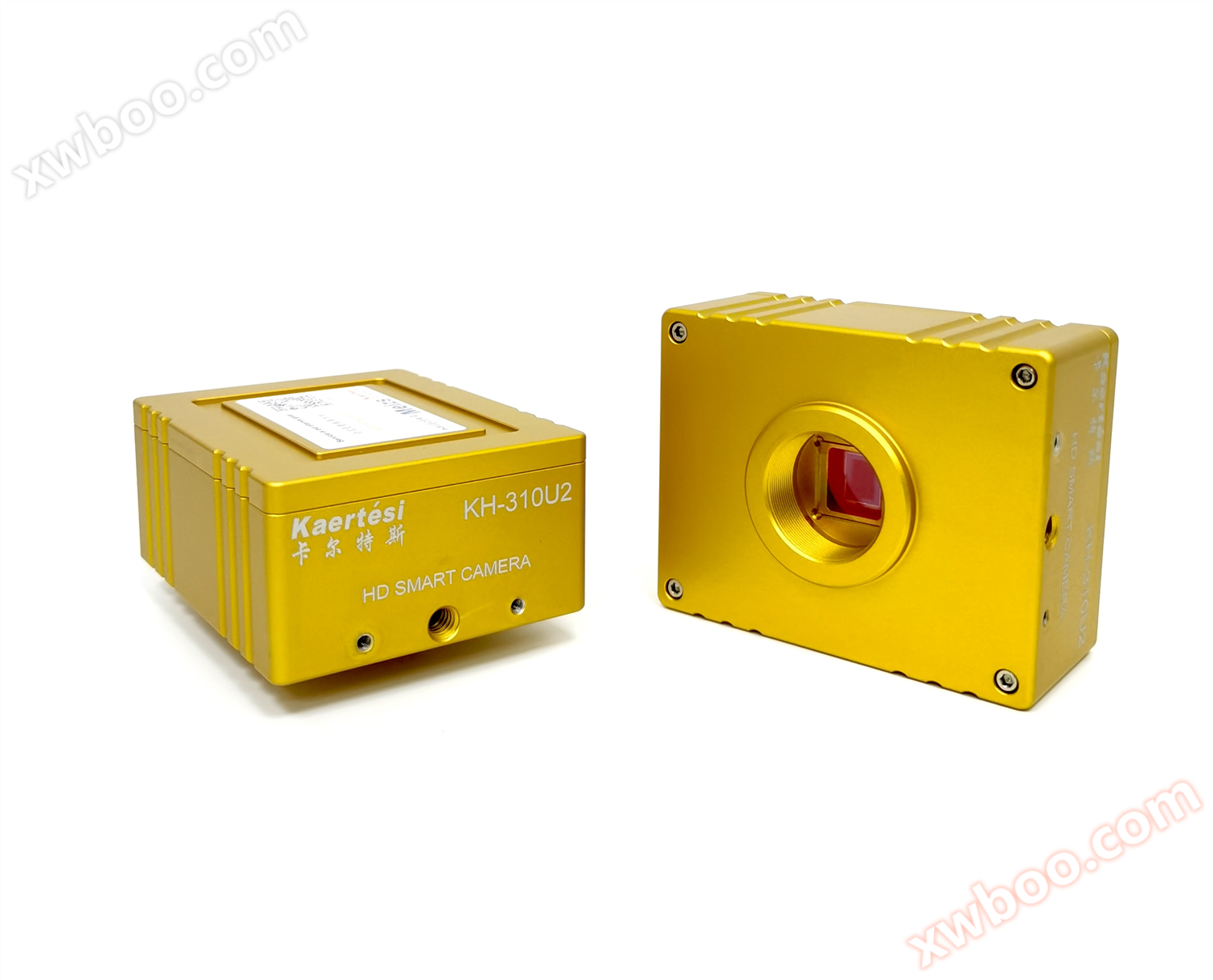
KRTS KH-310U2 High Definition Industrial Camera
NegotiableUpdate on 12/08
- Model
- Nature of the Manufacturer
- Producers
- Product Category
- Place of Origin
Overview
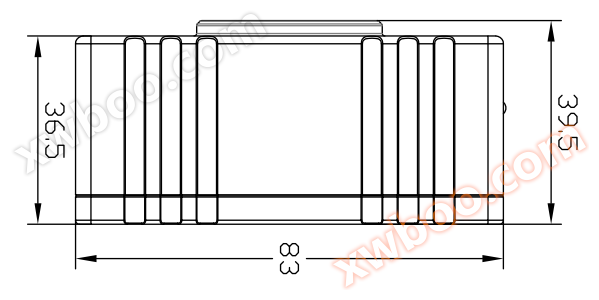
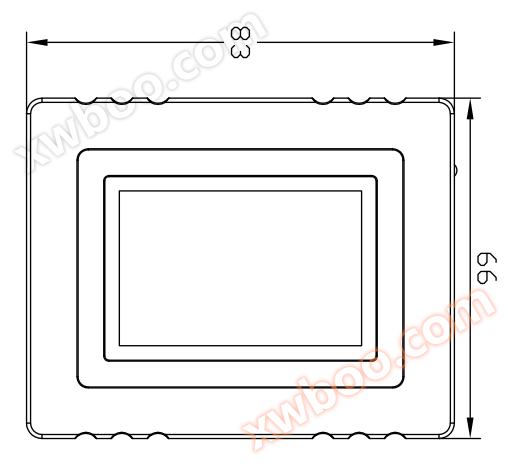
1、 Camera external dimensions 2. Camera interface introduction 1.2.3. Screw holes, 4. LED indicator light, 5.5V power interface, 6. USB interface, 7. HDMI interface 3. Camera matching device 1. Front end matching: C-port microscope and C-port lens
Product Details
1、 Camera dimensions
 2、 Introduction to Camera Interface
1. Front end matching: C-port microscope and C-port lens.
2. Backend matching: Supports HDMI 1080P@60Hz perhaps 1080P@50Hz monitor.
4、 Camera installation instructions
1. Connection between KRTS KH-310 camera and C-type lens.
2. Connect the monitor and camera using an HDMI cable.
3. Connect the mouse.
4. Use an adapter power supply to power the camera.
5、 Introduction to Menu Bar Functions
1. Language switching: Click on "Simplified" in the upper left corner of the menu, and you can switch between Simplified Chinese/English/Traditional Chinese/Japanese in the drop-down box.
2. Lock menu: Click the lock icon in the upper right corner of the menu to switch the menu display status.
When selecting 'Auto Exposure', the 'Brightness' can be adjusted; When selecting 'Manual Exposure', the 'Gain' can be adjusted. When selecting 'Manual White Balance', the 'Red Green Blue' color values can be adjusted.
5. Contrast: 0-15 values can be adjusted, reset the default value to 0;
6. Sharpness: adjustable from 0-15, reset to default value of 4;
7. Electronic amplification: 0-50 adjustable, reset to default value of 0.
8. Cross lines can be set and hidden, and colors can be selected. 9. Select "Save Image" and save it to a USB drive according to the selected naming convention.
10. Open Image: Click on the icon to open the path where the image is stored. Select the image to open and preview it directly on the monitor; Below the image, you can perform operations such as zoom in, zoom out, full screen, 1:1, previous, next, delete, and return.
11. Click on "Compare Images", the opened image will be displayed on the right side of the interface, and the real-time image will be displayed on the left side.
12. Click "Freeze" to freeze the current image interface, and the image window will remain stationary, making it easier to observe the object being measured.
When selecting "Record", the Rec icon appears at the bottom right of the screen to start recording. Click the "Record" button again to stop recording and automatically save to a USB drive in H264 format.
14. "Photo Settings" allows you to set the image format and naming conventions, with the selected format being BMP or JPG.
15. Select "Yes" to save the measurement elements on the image, and select "No" to not save them.
16. Inverted: Flip the image vertically; Flip: Flip the image horizontally.
17. Black and White: Black and White color mode. 18.50/60HZ: Anti screen flicker.
1. The device requires a DC5V power supply.
Before powering on the device, please connect the mouse first.
When saving images/videos, the folder is named after the date.
4. Support pedal and controller operation.
*All accessories are subject to the actual product
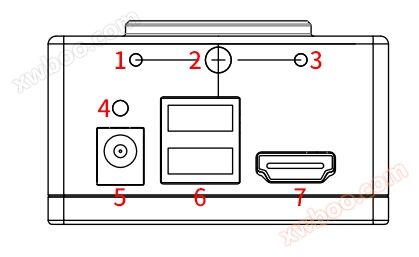
1.2.3. Screw holes, 4. LED indicator light, 5.5V power interface, 6. USB interface, 7. HDMI interface
3、 Camera matching device1. Front end matching: C-port microscope and C-port lens.
2. Backend matching: Supports HDMI 1080P@60Hz perhaps 1080P@50Hz monitor.
4、 Camera installation instructions
1. Connection between KRTS KH-310 camera and C-type lens.
2. Connect the monitor and camera using an HDMI cable.
3. Connect the mouse.
4. Use an adapter power supply to power the camera.
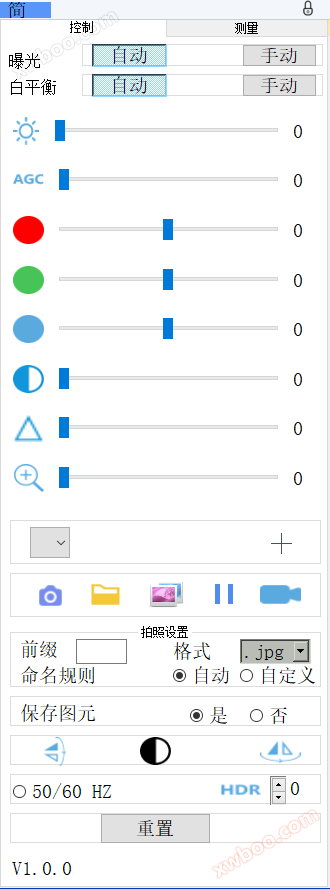
5、 Introduction to Menu Bar Functions
1. Language switching: Click on "Simplified" in the upper left corner of the menu, and you can switch between Simplified Chinese/English/Traditional Chinese/Japanese in the drop-down box.
2. Lock menu: Click the lock icon in the upper right corner of the menu to switch the menu display status.
When selecting 'Auto Exposure', the 'Brightness' can be adjusted; When selecting 'Manual Exposure', the 'Gain' can be adjusted. When selecting 'Manual White Balance', the 'Red Green Blue' color values can be adjusted.
5. Contrast: 0-15 values can be adjusted, reset the default value to 0;
6. Sharpness: adjustable from 0-15, reset to default value of 4;
7. Electronic amplification: 0-50 adjustable, reset to default value of 0.
8. Cross lines can be set and hidden, and colors can be selected. 9. Select "Save Image" and save it to a USB drive according to the selected naming convention.
10. Open Image: Click on the icon to open the path where the image is stored. Select the image to open and preview it directly on the monitor; Below the image, you can perform operations such as zoom in, zoom out, full screen, 1:1, previous, next, delete, and return.
11. Click on "Compare Images", the opened image will be displayed on the right side of the interface, and the real-time image will be displayed on the left side.
12. Click "Freeze" to freeze the current image interface, and the image window will remain stationary, making it easier to observe the object being measured.
When selecting "Record", the Rec icon appears at the bottom right of the screen to start recording. Click the "Record" button again to stop recording and automatically save to a USB drive in H264 format.
14. "Photo Settings" allows you to set the image format and naming conventions, with the selected format being BMP or JPG.
15. Select "Yes" to save the measurement elements on the image, and select "No" to not save them.
16. Inverted: Flip the image vertically; Flip: Flip the image horizontally.
17. Black and White: Black and White color mode. 18.50/60HZ: Anti screen flicker.
19. HDR: Wide dynamic range, adjustable from 0-3, reset to default value of 1.
20. Reset: Restore to factory settings.
21. Version number, which allows you to view the current software version number.
1. The device requires a DC5V power supply.
Before powering on the device, please connect the mouse first.
When saving images/videos, the folder is named after the date.
4. Support pedal and controller operation.
*All accessories are subject to the actual product
|
PRODUCT MODEL |
KRTS KH-310U2 |
|
SENSOR |
CMOScolor |
|
Effective pixels |
200megapixel |
|
Target size |
1/1.9」 |
|
menu |
all-digitalUIdesign |
|
operating mode |
Mouse operation |
|
Lens interface |
Ctype |
|
power supplyDC |
DC5V |
|
Output |
HDMI |
|
white balance |
hand movement/automatic |
|
Exposure method |
hand movement/automatic |
|
Display frame rate |
1080P@60fps / 1080P@50fps |
|
Scanning method |
progressive scanning |
|
Electronic Shutter |
1/50s(1/60s)~1/10000s |
|
operation temperature |
0℃~50℃ |
|
Digital amplification |
support |
|
Storage function |
Support external connectionsUDisk storage |
|
Measurement function |
Not supported (requires purchase)KRTS KH-310CSeries) |
Similar Product Recommend