-
E-mail
15381061713@163.com
-
Phone
15168328024
-
Address
Room 101, Building 7, No. 1218 Wenyi West Road, Cangqian Street, Yuhang District, Hangzhou City, Zhejiang Province (Room 101-18)
Product Categories
Hangzhou Xifu Technology Co., Ltd


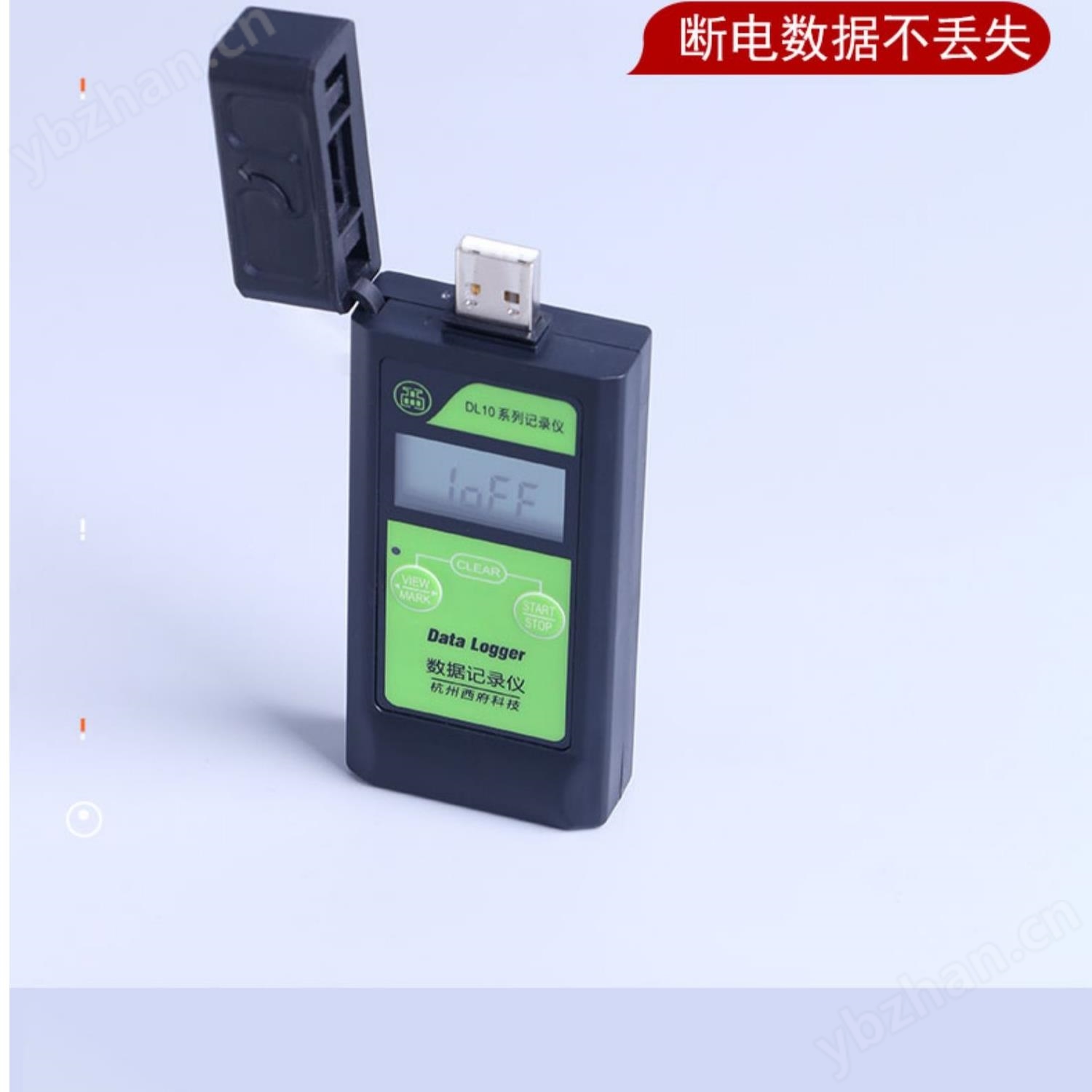
Rechargeable USB Temperature and Humidity Verification Recorder with Large Capacity 4S
NegotiableUpdate on 11/20
- Model
- Nature of the Manufacturer
- Producers
- Product Category
- Place of Origin
Overview
The DL10 series PDF temperature recorder is a rechargeable USB temperature and humidity verification recorder developed by Xifu Technology with a large capacity 4S download specifically for industries such as medicine, vaccines, blood, cold chain logistics, food, chemical, agriculture, meteorology, and animal husbandry. The $r $nPDF temperature recorder features an IP65 waterproof design, an ultra-thin and compact design, and is compatible with any usage scenario. Customers using the PDF recorder do not need to install drivers. After recording, they can directly plug it into the computer's USB interface and automatically generate reports in PDF or EXCEL format. And the report is encrypted to ensure data integrity and security.
Product Details
User Manual

DL10-TH 型UplatePDF Temperature and Humidity Recordrecordceremony
1、 Product Overview
DL10seriesPDFThe temperature recorder is a product developed by Xifu Technology specifically for industries such as pharmaceuticals, vaccines, blood, cold chain logistics, food, chemicals, agriculture, meteorology, and animal husbandry.
PDFThe temperature recorder is equipped withIP65Waterproof design, ultra-thin and compact design, compatible with anyOccasions for use.
customer usePDFThe recorder does not require driver installation and can be directly inserted into the computer after recording is completedUSBThe interface can be automatically generatedPDForEXCELFormat report. And the report is encrypted to ensure data integrity and security.
Rechargeable USB Temperature and Humidity Verification Recorder with Large Capacity 4S
IIProduct specific features
1IP65Waterproof design, ultra-thin and compact design, compatible with anyOccasions for use
2No driver installation, insertUSBInterface, automatically generatedReport in PDF/EXCEL format, supporting multiple systems such as Windows XP/7/8/10, Mac, etc
3Strict encryption technology generates tamper proof reports to ensure the authenticity and security of data, in compliance withPDF/A standard
4Customers configure various parameters themselves through software(Upgrade later)For example, upper and lower limit values, recording intervals, delayed startup, etc
5PDFRecorder recording capacity standard35000Group, supporting expansion
6The report includes data reports, curvesMKTValue, record interval, record days, etc. The report supports Simplified Chinese, Traditional Chinese, English, etc
Fast report file generation and export35000Group data, generate encryptedPDFdocument
7Gold plating, lead-free spray painting and other processes ensure product quality
8pass±30KVstatic electricityESDTesting ensures the reliability of product usage
9PDFRecorder in low temperature environment(-40Around ℃)Can work normally, exporting files is normal. In low-temperature environments,PDFRecorder,1At least the minute recording interval can be used2Year (at room temperature)
Rechargeable USB Temperature and Humidity Verification Recorder with Large Capacity 4S
3、 Technical parameters
model |
DL10-TH |
temperature range |
-40~100(℃) |
temperature accuracy |
±0.3(-25~85℃)/±1(-40~100℃) humidity accuracy ±3% |
sensor type |
Imported temperature sensor (with certification report, can be exported) |
Temperature Display |
Fahrenheit degrees(℉)/Celsius (℃) |
Operating Temperature |
-40~100(℃) |
Standard Records |
reachable35000Group (expandable) |
Report Type |
PDF/EXCEL |
alarm method |
Single, cumulative, prohibited |
alarm delay |
Time can be set |
Upper and lower limit values |
Adjustable |
recording interval |
Time can be set(1The minute recording interval can be used2Years and above) |
startup delay |
Time can be set |
Operation keys |
2A button used for starting, stopping, printing data, querying maximum and minimum values, and dates |
display |
Segmented LCD display |
interface |
USB2.0 |
power supply |
3.6V CR14250(1200mAh)lithium battery |
size |
95*50*19mm |
Protection level |
IP65 |
4、 Product schematic diagram:
button [VIEW/MARK]
button [START/STOP]
battery cover
Fixed spare board
4.1 Key functions:
4.1.1button[VIEW/MARK]
short press-----Display year, month, day, and temperature in sequence(MAX)Temperature(MIN)Humidity(MAX)HumidityMIN).
long press----
4.1.2button[START/STOP]
short press----light upLCDdisplay
long press ----Stop recording and display1END/1oFF
------Open the record to display temperature and humidity
4.1.3Combination key button[VIEW/MARK]+button[START/STOP]
Press simultaneously ---Record data clearing(The device is in a shutdown state)
5、 Operation steps
1Connect to the computerUSB口
2After the computer recognizes it, the display screen showsPNAs (Total Pages),Show againP01----PNN(PNNActual number of pages loaded)Finally displayed5END.
3Open the data report on the newly generated removable disk on the computer and view the data.
4. You can also use the company's xRecorder software to download historical data and save it to your computer for easy backup twice, and save it as a file
PDF, CSV, TXT, XF format files
Note: Factory default parameter settings for the recorder
Record cycle: |
||||
Record interval: |
||||
Report content

7Other precautions
7.1 PDFRecorder display code description:
“0ERR” :The system time is incorrect and the device cannot function properly. Please insert the computer and use the accessory tool to calibrate the time
“1oFF” :Manual shutdown did not turn on, long press the power button to turn on;
“2oFF” :Scheduled startup without power on
“1END” :Manual shutdown, can be restarted by long pressing the power button;
“2END” :Timer Stop;
“3END” :Storage stopped;
“4END” :Stop recording until the set number is reached;
“5END” : USBInsertion stop;
7.2ThePDFPoints to note when exporting files
7.2.1PDFThe recorder is powered on normally but has no data. It is plugged into the computerUThe disk is empty, possibly due to no recorded data
7.2.2When waking up the device,Device Display”0ERR”time,Equipment processing time error status,Do not record data,Please plug in the computer and use the configuration tool to calibrate the device time
7.3When the device battery level displays a blank space,Please replace the battery in a timely manner,Otherwise, it will affect the normal recording of data by the device.
Similar Product Recommend