-
E-mail
1172591273@qq.com
-
Phone
1806687891213347428711
-
Address
5th Floor, Tongda Building, No. 10 Keji Road, Xi'an City
Product Categories
Xi'an Xinmin Electronic Technology Co., Ltd

XMTH-W/G wireless temperature and humidity transmitter
NegotiableUpdate on 12/16
- Model
- Nature of the Manufacturer
- Producers
- Product Category
- Place of Origin
Overview
1、 The product Jianjie XMTH-W/G wireless temperature and humidity transmitter is a wireless communication function product that uses Swiss imported digital temperature and humidity sensors, combined with dedicated GPRS or WiFi modules, to truly achieve remote and intelligent data collection
Product Details
1Product Boundary
XMTH-W/G The wireless temperature and humidity transmitter is a wireless communication function product that uses a Swiss imported digital temperature and humidity sensor, and is equipped with a dedicated sensorGPRSorWiFiModules truly achieve remote and intelligent data collection.
The product is widely used in warehouses, transportation, medicine, electricity, agriculture, households and other occasions. achievable24Automated data collection with unmanned monitoring for hoursAccording to the needs, multiple permissions can be assigned to relevant personnel simultaneously. If the temperature and humidity are abnormal, timely response can be made to minimize losses!
2、 Product Features
1What is the communication method of the wireless temperature and humidity collectorGPRS(No distance limit) orWiFi.
implementGPRSThe necessary conditions for data communication include:(a.There is a fixed oneIPOr fixed domain nameb.haveSIMData card(Mobile cards are also acceptable))
2XMTH-W/GWireless temperature and humidity collector built-in4000MA,3.7VHigh quality and high-capacity rechargeable lithium battery (charging voltage)5V)In standby mode, the power consumption is less than7uAActual test data:XM200GFully charged, data can be sent once per minute13000time;XM200WFully charged, data can be sent once per minute40000time
3Users can view the temperature and humidity data uploaded to the cloud center using a computer/tablet/Mobile LoginWebView the website on your mobile phoneAPPview
3、 Temperature and humidity measurement range and accuracy
4、 Cloud Platform User Manual
The cloud platform continuously records data uploaded by temperature and humidity transmitters around the clock. Users can access it throughPCReal time viewing of data on end or mobile terminals. This system adoptsB/SLightweight applications with architecture that do not require installation of application software, can complete real-time data queries and historical data access through a browser.
For the convenience of user hierarchical management, the backend can assign user permissions.
Normally,PCThe end has editing function, while the mobile end only supports data access.
***PCEnd user manual
User login
Open a browser to access:http://121.42.47.194/front/index.action
Enter the login interface and input login information:Username:xinmin, Password:xinmin;
 image 4 Login screen
Main Interface

image 5 Main Interface
Data View
1)Icon mode
The icon mode display interface hasThe "auto refresh" switch allows users to configure the refresh time interval, and the front-end retrieves server data at regular intervals based on the time interval.

image 6 Icon mode
2)List Mode
List mode, visually displaying all parameters of all devices in a list. After each device information display line, there areQuick access to "Curve Chart" and "Data Table", as well as the latest "Update Time" for this data.

image 7 List Mode
2)Map display mode
In map display mode, when the user points to the device they want to view, a display box will pop up to show all the parameters of the device.
image 8 Map mode
2)Real time and historical curves
Real time and historical curve charts provide a more intuitive display of data trends. Users can choose the time period they need to observe and clickSimply 'search'.
Ødata table
clickData Table ", enter the historical data list mode, click" Export Table "to output historical dataexcelTable. The data table pattern is shown in the figure9As shown:
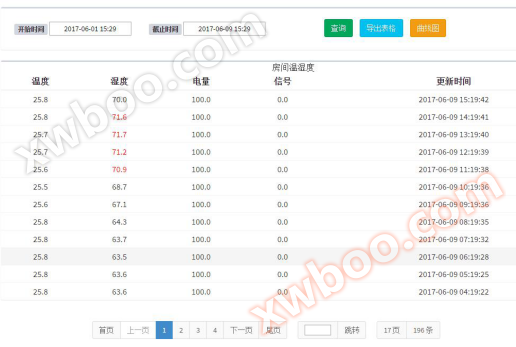
image 9 data list
Øcurve graph
clickCurve chart ", entering the historical curve chart mode, users can choose between" dynamic display "and" fixed display "modes.
Click on the physical quantity label on the right side of the curve graph to turn on or off the parameter curve.
special,'Distance up' refers to the time interval between the current upload and the last upload of data, and this curve reflects whether the device has experienced disconnection during operation.

image 10 curve graph
***Mobile Terminal User Manual