-
E-mail
service@h3c.com
- Phone
-
Address
H3C Company, 466 Changhe Road, Binjiang District, Hangzhou City
Product Categories
New H3C Technology Co., Ltd

H3C Learningspace
NegotiableUpdate on 12/27
- Model
- Nature of the Manufacturer
- Producers
- Product Category
- Place of Origin
Overview
H3C Learningspace is a cloud classroom integrated desktop solution developed independently by New H3C, based on a hybrid architecture of VDI and VOI, designed for educational and other scenarios. It combines the flexibility of VDI cloud, centralizes resources (including systems, applications, data, etc.), allocates virtual desks to students on demand, and offers cost-effectiveness in the form of fat terminals. With low investment, it meets high load requirements such as new curriculum reform, 3D modeling, and video processing. The construction plan consists of three main parts: data center, transmission network, and terminal side. The data center includes server clusters, distributed storage, Learningspace system (management end, teacher end, student end), agentless antivirus (optional), load balancing (optional), value-added application system (optional), etc; The transmission network includes management network, business network, storage network, and terminal access network; The access side includes student fat/thin terminals and teacher machines. The Space Console management platform centralizes control and unified management, with fat/thin terminals accessing the data center to obtain desktops, and teacher side subdividing permissions to control all terminals and desktop behaviors within the classroom under its jurisdiction. Learningspace is tailored to computer room scenarios such as general education, vocational education, and higher education, covering various needs such as teaching and training, multi desktop switching, workspace, student self-study, national exams, development programming, 3D design, as well as providing campus cloud storage, customized integration with educational systems, and other campus applications.
Product Details
Product Features
Easy deployment, tenfold efficiency improvement
H3C Learningspace achieves remote operation and maintenance through a unified web management console, centralized management and monitoring of data center resources. The overview interface intuitively displays system health, total number of courses/classrooms/users, desktop operation status, resource utilization rate, abnormal alarm information, etc. You can click on each module to further view detailed information.
automatic installationIn addition to pre installing all necessary programs at the factory, the all-in-one machine also provides bare metal installation, integrated packaging of underlying virtualization, distributed storage, management platform programs, etc. With one image import, the next step can be automatically executed until the installation is completed.
One click inspectionAfter deployment, post maintenance, fault location, and more, the platform can automatically detect system vulnerabilities and provide optimization suggestions with just one click health check.
Template optimizationThe course image utilizes automatic optimization tools to perform hundreds of performance optimization actions on the operating system, maximizing the desktop user experience.
Automatic upgradeUpload upgrade packages on the management platform, all terminals automatically detect and download them, and the server backend, teacher end, and student end automatically perform upgrade operations without manual intervention.
Learningspace leaves the most complex code logic to the R&D layer and presents the simplest and most understandable operations to the front-end, maximizing the savings of manual labor and improving efficiency.

Vibrant classroom with diverse teaching methods
Learningspace is equipped with a self-developed teaching management software from New H3C, specially customized for educational scenarios.
Basic functionsTemplate switching (one click start and finish, different templates for different courses), screen broadcasting, check-in, student demonstration, file sending and receiving, screen monitoring, one click internet ban, offline escape, one click restart, seat adjustment, USB disk disable, full screen silence, self-study mode, account mode, virtual classroom, remote assistance, electronic teaching whip
Voice relatedVoice broadcasting, group discussions, student speeches, voice conferences, individual calls
Featured FeaturesFor live courses, basic courses for large classes, and other needs, the teacher can select multiple classes to merge into one logical large class at any time for unified teaching and control.
There are all kinds of commonly used functions available, and Learningspace has achieved breakthroughs in both experience and cost. In addition to being built-in, it also supports seamless integration of third-party multimedia teaching software to ensure the continuation of the teaching habits of teachers for many years and reduce learning costs.

Test exam, save 99 steps
Paperless exams, with many advantages such as confidentiality, environmental protection, and efficiency, are gradually replacing paper-based models. Learningspace has built-in testing platforms and automatic deployment modes for exam environments.
In class testingTeachers can initiate assessment tests in the form of single answer, whole class answer, random answer, etc. After the test is completed, the system automatically scores and scores the students. The test results are included in the student points system and displayed in the ranking wall of the campus space. Teachers can use this as a reference to evaluate the quality of students' classes.
Customized examination roomSupports multiple exam scenarios, such as the National Computer Level 1 and Level 2 Exam, Social Professional Title Exam, etc., and supports exam deployment requirements such as ATA and NCRE. At the same time, provide exclusive exam images and customize the retention period of the exam desktop (complete desktop environment and file data), so that if there are any objections to the exam results, they can be traced back for future reference.
Whether it is paper exam paper grading or manual environment deployment on PC, the workload is all overnight. However, Learningspace has developed a large number of automated processes, following the principle of "if you don't need to do it, don't do it" and "if you can save time, save time", to improve the efficiency of teachers by a hundred times and avoid unnecessary paths.

Online storage sharing, no more hardware copying
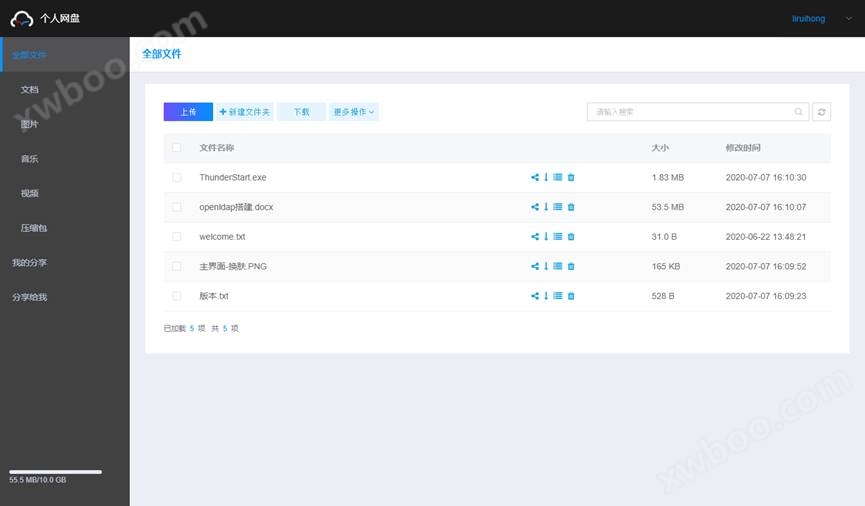
Learningspace has built-in cloud storage function, provided by distributed storage services, providing multiple guarantees for data security. Each teacher and student can be assigned a private campus cloud storage, which permanently retains personal data during their school period. Access is not limited to the cloud environment, and the campus network can be accessed by logging in to obtain their own exclusive data, saving the embarrassment of forgetting to bring a USB drive and blocking the spread of viruses. Provide classification queries, share files, and work with workspace functions to make data sharing borderless and further enhance learning fun.
Ultimate performance, fully enjoy 3D rendering
As one of the few NVIDIA authorized VDI manufacturers in China, H3C has vGPU technology, which can virtualize enterprise level graphics cards and distribute powerful GPU computing power to cloud desktops, greatly enhancing the graphics processing capabilities of VDI architecture. Flexible allocation of video memory, freely split according to usage needs, enables smooth running of 3D applications using OpenGL and DirectX. Centralized management of graphics card resources in the cloud, with visualized GPU resource monitoring and management functions, effectively reducing operation and maintenance costs.
At the same time, Learningspace also provides a more cost-effective solution. The VOI component supports fully leveraging the hardware performance of fat terminals, providing CPU and integrated graphics cards to high load application scenarios such as graphics design or video processing without loss. The backend does not require a large amount of server resources, saving data center construction investment. At the same time, the built-in cloud storage function can roam the file data produced by terminals, which not only ensures security but also provides convenience.

Homework space, fun cloud quiz
Teachers can create their own course groups, which include student accounts for this class. Students have corresponding login and usage permissions, and all operations are browser accessible, not limited to specific environments such as classrooms, dormitories, and libraries. Homework can be done anytime, anywhere.
Cloud homeworkTeachers can edit and publish assignments in this course group, set submission deadlines that are visible to all students in the course, and reject submissions if they fail.
Comment interactionTeachers will automatically present data statistics reports on the platform for grading and grading, such as the number of submissions and average scores. At the same time, teachers can select excellent answers for public display, and all students can comment and leave messages on them.
Micro Classroom SpaceDuring class, the teacher's end can record the screen and upload the complete content of the class to the micro lesson space for sharing as an open class or review video. Students can also watch micro lesson videos for learning, liking, commenting, and replying.
Teacher role:

Student role:

Security strategy to ensure foolproof measures
In terms of security, Learningspace has implemented numerous security mechanisms and multiple safeguards to eliminate potential risks and concerns.
Cluster technologyDistribute the student desktops of each classroom evenly across all cloud hosts to avoid single host pressure overload and ensure that there are no situations where some hosts are idle while others have extremely high utilization rates. All cluster resources can be provided to a single classroom for use when other classrooms are not in class, resulting in a 10 fold improvement in performance.
hot standbySupport cluster splitting, where each cluster can independently undertake business functions. After the split cluster is restored to the network, it can be merged again to restore the original business. Ensure that the computing, storage, network, and other resources used by the school during exams and grading are completely physically isolated from normal business operations, and all business operations continue as usual.
Permission recyclingTo prevent student misoperation and ensure the security of the exam scenario, data will not be cleared when the student terminal is powered off, the desktop is shut down, restarted, or even hardware is damaged. Only when the teacher clicks' end class' will the student desktop be restored. The faulty terminal will be replaced on-site, and the virtual machine will still maintain its previous state and automatically reconnect.
Teacher end offlineReal time detection of abnormal interaction between the teacher's end and the cloud desktop platform, allowing them to switch between offline and online states on their own. In offline mode, teachers do not rely on cloud desktop data centers for screen broadcasting, screen monitoring, voice broadcasting, student speaking, voice discussion, remote assistance, student broadcasting, and more.

Diverse terminals, brand guarantees quality
Different terminal systems correspond to different scenario requirements, greatly improving the scope of application: VDI is flexible and adaptable, with strong plasticity, capable of carrying ordinary business scenarios, horizontally scalable, and equipped with vGPU technology to meet high-performance 3D rendering needs; VOI local computing, leveraging the full performance of the terminal, storing data in the cloud, saving server resources, and reducing investment costs.
ARM architecture, X86 architecture, split machine, all-in-one machine, old cost-effective, new high-performance... Various forms are available for selection, with compact size, integrated body design, and straight line noise reduction. Thin terminal embedded chip, with a minimum PC power consumption of 1/30; Fat terminal desktop level CPU, super powerful performance. Without vulnerable components such as fans and mechanical hard drives, it can basically achieve zero hardware maintenance. Compared to PCs, it has a longer service life, saves expenses, and reduces electronic waste. Built in self-developed Space OS system, can be remotely controlled by opening the box and accessing the internet.


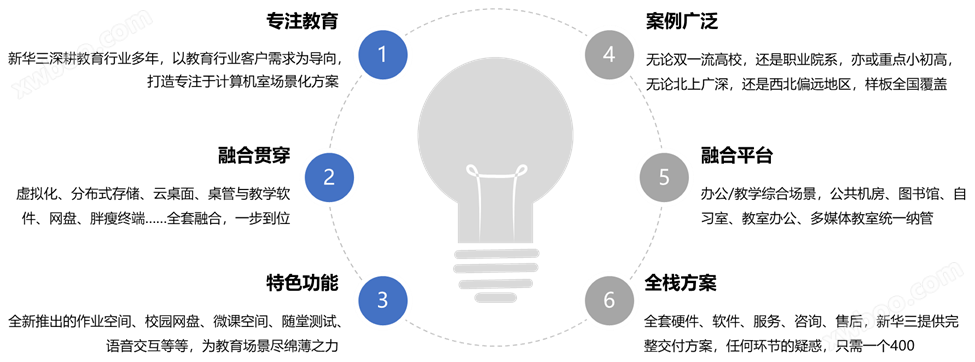
Advantages of the plan
Application scenarios

Program value

success cases


For more details, please visit the official H3C website at www.h3c.com
Function Introduction
1. Support specifying the IP address and number of students for virtual classrooms, and monitoring the real-time status of each classroom, such as the courses currently being taught. Support batch switching of virtual machines (in class and out of class) in virtual classrooms on the management platform.

2. Support batch remote commands on the teacher's end, allowing remote control of all students' virtual desktops, such as simultaneously opening IE browser, opening drawing board, closing certain programs, etc., and supporting users to add custom remote commands.

3. The teacher's end can enable individual voice calls between students at any time, allowing students to communicate one-on-one with other students through voice regardless of whether they have entered the desktop. At the same time, students can also see the call time, and the teacher's end can see the student's call status.

4. The teacher can activate the free speech mode at any time, and the designated student's speech can be heard by the whole class, supporting no less than 4 people to speak simultaneously.

5. The teacher's end can record the screen during class and upload the complete class content to the micro class space for sharing as an open class or review video. After logging into the micro lesson space, students can view micro lesson video on demand for learning, and can like, comment, and discuss.

6. Support mirror cold and hot data backup solutions. You can back up the images in the shared storage to your local device. In the event of a shared storage failure or offline, you can easily switch to the local backup image for normal teaching work.


