-
E-mail
jbsyp@163.com
-
Phone
13584183217,13511659751
-
Address
591 Sheng'an Road, Wuxi City
Product Categories
Weibo Instrument Jiangsu Co., Ltd
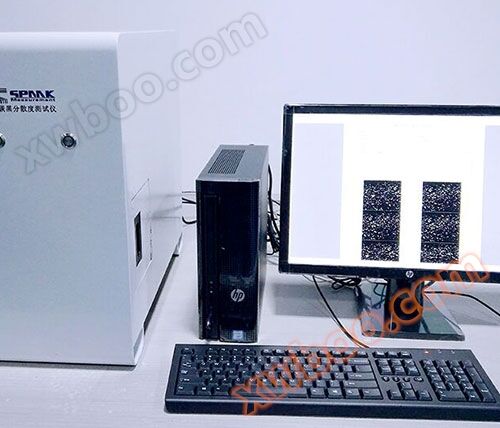
HK6030 Rubber Carbon Black Dispersion Tester
NegotiableUpdate on 07/29
- Model
- Nature of the Manufacturer
- Producers
- Product Category
- Place of Origin
Overview
Recipient (TO): Limited Company Sender (FROM): Zhang Daicheng Recipient (ATTN): Content (SUBJECT): Quotation Phone: (TEL): Date: December 10, 2018 Mobile: Mobile: Fax: Page (PAGE): Page 1 of 16 Hello! Thank you for your trust and support. We are honored to serve your company and will provide you with high-quality service to ensure your satisfaction
Product Details
Recipient Unit(TO): Ltd. Sender(FROM)Zhang Daicheng
Recipient(ATTN): Content(SUBJECT): Quotation sheet
Phone:(TEL): Date(DATE):2018-12 -10
Mobile phone(Mobile): Mobile phone(Mobile):
Fax(FAX): Page count(PAGE): The1common 16page
Hello!!
Thank you for your trust and support. We are honored to serve your company and will provide you with high-quality service to ensure your satisfaction. According to the requirements of the rubber carbon black dispersimeter required by your company, the following solutions are recommended:,Please refer to!
Carbon black analyzer configuration and price
|
Serial Number |
product name |
PRODUCT MODEL |
unit price |
origin |
|
notes |
|
1 |
Carbon Black Dispersion Tester |
HK6030 |
68000.00 |
HK |
Manual standard configuration |
Manual focus, manual platform, equipped with computer, software printer, pixel count500Wan, Domestic high-definition optical system optical system |
|
2 |
Carbon Black Dispersion Tester |
HK6030 |
88000.00 |
HK |
Manual high-end configuration |
Manual focus, manual platform, equipped with computer, software printer, pixel count1000Wan, Imported high-definition optical system optical system |
|
3 |
Carbon Black Dispersion Tester |
HK6030G |
108000.00 |
HK |
Automatic standard configuration |
Auto focus, mouse automatic control electric platform, equipped with computer, software printer, 500Ten thousand pixel camera, domestic high-definition optical system |
|
4 |
Carbon Black Dispersion Tester |
HK6030G |
128000.00 |
HK |
Automatic high-end configuration |
Auto focus, mouse automatic control electric platform, equipped with computer, software printer, 1000Ten thousand pixel imported camera, imported optical system |
Partial customer list:
Shanxi Evergrande Chemical Co., Ltd Mainly producing rubber carbon black raw materials
Sichuan Xinjin Tengzhong Heavy Industry Mainly producing rubber shock absorbers for high-speed rail and automotive components
Shanxi Taiyuan Institute of Technology Mainly engaged in research and analysis of polymer materials
Jiangsu Changzhou Changyun Engineering Co., Ltd Mainly engaged in the research and production of waterproof materials
Shanghai Luoshi Enterprise Group Co., Ltd Mainly engaged in the research and production of automotive components
Zhejiang Zhongding Rubber Co., Ltd Mainly producing rubber automotive parts
Anhui World Materials New Materials Co., Ltd Mainly producing green recycled rubber, mixed rubber new materials, and rubber products
Rubber carbon black dispersibility tester

HK6030Outline drawing of rubber carbon black dispersibility tester
1、 Overview
The dispersion degree of carbon black in rubber, which refers to the dispersion status and uniformity of carbon black in the rubber material, directly affects the performance of rubber, such as its tensile strength, tear performance, fatigue performance, wear resistance, etc. Therefore, quickly and accurately mastering the dispersion of carbon black in rubber compound can predict the physical properties of the compound, control the mixing process, ensure the quality of rubber products, and improve production efficiency,Saving energy and reducing costs are of great significance.
Rubber carbon black dispersibility testerAccording to international standardsISO11345A specialized testing instrument designed using mathematical statistics technology, computer recognition, and fuzzy processing technology, mainly used for the determination of carbon black dispersion in rubber. The instrument adopts a modular design concept, integrating multiple systems such as computer, optical, electrical, digital conversion, and detection software. It has functions such as automatic grading, image comparison, particle size analysis, result storage, and report printing. The instrument has a simple appearance and is easy to operate.
Rubber carbon black dispersibility testerIt can be used for laboratory testing of vulcanized rubber and mixed rubber, as well as online testing of mixed rubber.
According to a large number of experiments, due to the differences in properties between vulcanized rubber and mixed rubber, this instrument is more effective in determining the dispersion of carbon black in vulcanized rubber
Accurate, and the surface properties (roughness) of the mixed rubber may not only include undissolved carbon black clumps, which may affect the image. Therefore, it is recommended that users refer to the automatic grading results for the dispersion of carbon black in the mixed rubber, accumulate experimental data, and establish their own product formula standard library.
(1) Instrument composition


3Other attachments;
(2) Working principle
Rubber carbon black dispersibility testerThe working principle is that when rubber (vulcanized rubber or mixed rubber) is cut, due to the high hardness of undissolved carbon black aggregates relative to the surrounding rubber medium, it will cause deviation of the cutting trace, resulting in a rough and uneven surface of the cut. In general, the larger the undispersed carbon black aggregates, the more severe the deviation of cutting marks, and the greater the surface roughness, while the opposite is true. Using a certain angle of light to irradiate the cut surface of rubber, if the carbon black is well dispersed in the rubber, the cut rubber surface will have a smooth and defect free structure. If carbon black is not well dispersed in rubber, it will present raised clusters of different sizes on the surface. Based on the size and frequency of these protruding clusters, the degree of carbon black dispersion in rubber can be characterized. Apply the surface of the adhesive materialThese situations are magnified and directly reflected on the display screen, and recorded as digital images. Digital images are processed by computers to automatically evaluate the dispersion level of carbon black based on relevant international standards (automatic grading function). It can also be directly compared with the standard images stored in the instrument or the standard images formulated by the enterprise (image comparison function).Working principle diagram

(3) Main parameters
1Host computer configuration:CY2.4GHZ/256MB DDR/80GB/16X CD-ROM;
2. Testing software:“Rubber carbon black dispersion detection system”The system is suitable forWINDOWS98/XPOperating system;
3Precision gradeCCDCamera system:
|
Total pixels |
795 (horizontal) × 596 (vertical) |
|
scanning system |
625 lines, 50 matches per second |
|
Synchronization |
Internal synchronization/vertical synchronization lock |
|
horizontal resolution |
600 lines |
4. Sample window aperture:2mm;
5Test area:1.7 mm×1.25 mm;
6Optical magnification: 100Double;
7Light source illumination angle:30°;
8Image size:4000×3500Pixel;
9Image storage format:BMP;
10Instrument working power supply:220V/2A/50Hz.
instructions
1、 Installation
Connect the host, monitor, keyboard, and mouse according to the installation method required by a typical computer, and finally connect the power cord.
Please use a power supply with grounding protection.
3、 Power on
1Press downHost power switchConnect the host power supply;
2Press downCamera system power switchConnect the power supply of the camera system;
3Click on the "Rubber Carbon Black Dispersion Detection System" icon on the screen to enter the main operating interface.To ensure stable camera performance, please preheat the camera system after each power on10Come in in in minutesPerform camera operation;If the camera operation is not carried out for a long time, please turn off the power of the camera system.
4、 Sample
1Keep the cutting tools and rubber pads clean, and there should be no defects or dirt on the cutting edge and surface of the blade. For newly replaced blades, the surface grease should be thoroughly removed. Before each sample cutting, it is advisable to clean the surface of the blade with acetone.
Please pay attention to safety when using sample cutting tools.
2Generally, adhesive samples should be stored and cut at standard laboratory temperatures;
For excessively soft rubber compounds, appropriate freezing treatment can be carried out in advance.
For mixed rubber with more pores, the rubber sample can be first placed in105℃1kPaCompression under conditions 5Minutes to remove most of the pores.
3Pre cut the adhesive sample into approximately10mmWide rubber strip;
4Holding the sample cutting tool handle with one hand,Push the sample adhesive strip under the blade with the other hand, visually ensuring that the slice thickness of the adhesive sample is within2.5mm(vulcanized rubber) or5mm(Rubber compound)about. Fix the adhesive sample by hand and quickly cut the sample with a knife;
5After sample preparation, the surface to be tested should be kept fresh, free from contact and contamination, and tested as early as possible. To avoid prolonged storage time,Causing differences in experimental results.
6Place the cut sample in the middle of the groove of the sample cover plate, exposing the surface to be tested.
There are two deep openings on the sample cover plate2mmThe widths are2mmand4mmThe cross groove is used to place samples of vulcanized or mixed rubber.
7Attach the sample cover plate to the sampling window of the host and ensure that the direction of the instrument's internal light is the same as the direction of the blade's movement when cutting the sample
8On the main operating interface of the "Rubber Carbon Black Dispersion Detection System" software, clickacquisitionThe key will display an image of the surface of the tested sample in the imaging window. Slowly rotate the left side of the hostFocus adjustment knobUntil the image is completely clear.
5、 Testing
(1)Main operating interface
The main operating interface of the "Rubber Carbon Black Dispersion Detection System" consists of a control panel, grading result display area, information input area, image acquisition window, reference image window, binary image window, particle size distribution map window, and experimental information table.
Main operating interface

Image acquisition:After placing the sample, click on the control panelAcquire ImageKey, adjust the focal length to clarity, clickCapture imagesKey, the image acquisition window will capture images for automatic grading or image comparison.
control panel

The graded images can also be images stored in the device:acquisition Right clicking on the window will bring up a dropdown menu for selecting the image path, allowing you to import images from any gallery on the device for automatic grading or image comparison.
1Information input:The "Rubber Carbon Black Dispersion Detection System" provides input fields for information such as rubber material name, rubber material number, rubber material type, mixing date, tester, and test date in the information input area, to facilitate data classification and future retrieval.
Information input area

Before performing automatic grading operations, if the information in the input area is incomplete, the system will give a prompt.
2 Automatic grading:For the collected or imported images, clickgradeKey, the "Rubber Carbon Black Dispersion Detection System" will automatically perform gradingData display areaProvide: carbon black dispersion levelYThe numerical values of value, maximum particle size, and particle area.
Data display area

At the same timebinary imageWindowReference imageWindowParticle size distribution mapWindow, displaying corresponding black and white binary imagesISOStandard image and particle size distribution map. And record all the information of this grading test in the experimental information table.
Experimental Information Table

1Image comparison:existacquisitionWindowReference imageWindowbinary imageWindowParticle size distribution mapRight clicking on the window will bring up a dropdown menu for selecting the image path. You can retrieve any image from the instrument system and compare it with experimental images, standard images, historical images, and other images stored in the instrument on the same interface.
(2) Data management interface
The data management interface displays saved experimental record data, which can be queried, opened, and printed. The upper part of the interface displays the query results, including particle distribution maps, images, and related data information of the query results.The lower part of the interface is the query operation area.
Data management interface

1 query operation: ThroughquerySelect the checkbox of the area as needed (can be queried with a single condition or a combination of multiple conditions)Rubber material name、Rubber material number、Type of rubber material、Mixing date、TesterandTest dateWait for the information query conditions and fill in the conditions that need to be queried.
Query area

Click againqueryThe key. The system will display all retrieved results that meet the query requirements in the data management interface (list).
list

2 Open RecordBy using the selection key in the lower right corner of the data management interface, select the query result to be displayed in the data management interface (list), and the system will display its content in the upper part of the interface, including particle distribution maps, images, and related data information.
Select key

1 Print RecordFor opened records, click onprintKey, the system will print the selected test record,Including particle distribution maps, images, and related data information.
2 delete recordSelect the record to be deleted from the data management interface (list) by pressing the selection key at the bottom right corner of the interface,clickdeleteKey, the system will delete the record in the data management interface (list).
Note: This operation is irreversible.
6、 Maintenance
Due to the presence of precision optical components inside the instrument host chassis, severe and large vibrations should be avoided during transportation. During installation, care should be taken to handle with care and not invert.
1This instrument should be placed in a ventilated and dry environment for use. Avoid exposure to strong sunlight, dust, acid, alkali, and corrosive substances, and avoid interference from strong magnetic and electric fields.
2When entering room temperature from a lower temperature, do not immediately turn on the machine. Wait for the temperature and room temperature to balance before turning on the machine to avoid damage;
3If the system fails to function properly during the use of this instrument, please notify our service engineer or use it under the guidance of a service engineer for restoration. To ensure the normal operation of the instrument, please do not use it for any other purpose;
4This instrument undergoes strict debugging and inspection before leaving the factory. Please do not disassemble or assemble any part of the instrument. If there is any malfunction or other problem, please contact the maintenance service department of this instrument in a timely manner, the sales service hotline.
Similar Product Recommend